

Everyone requires power in one’s hand, so do the users of your product. They want to use products as independently as they can. That is what the user documentation does – empowers user with product knowledge so one can solve one’s problem quickly and independently. Depending on the know-how, some customers might require help in using a product for the first time, while others might want to solve an issue with an existing product. Therefore, various types of user documentation exist with the purpose of helping different types of users. In this article, we discuss
- Definition of user documentation
- Usage and importance of user documentation
- Steps to create user documentation
- Types of user documentation, and their characteristics
User documentation
User documentation, also referred to as end-user documentation, refers to any kind of documentation that is created to help the end-user use the product or service smoothly and solve the related issues on their own. It informs users about installation steps, licensing, usage, features, troubleshooting, etc.
In other words, it lets customers make the most out of your product. By using documentation, users can help themselves which gives them a sense of satisfaction and builds confidence in brand.
Good user documentation is helpful for both customers and businesses. On one hand, user documentation provides customers the necessary information to use a product or service without requiring specialized training or external help. At the same time, it ensures customer satisfaction through a good documentation experience and helps organizations build rapport with its customer base.
Importance of user documentation
Quick help to users
Providing a solution to the customer’s issue is the first goal of any documentation. That issue could be about getting started with the product or about implementing advanced features. With documentation in hand, a user does not need to contact customer support or wait for their responses. Documentation provides proper explanation and step-wise instructions, so users can easily understand how to use and operate a product.
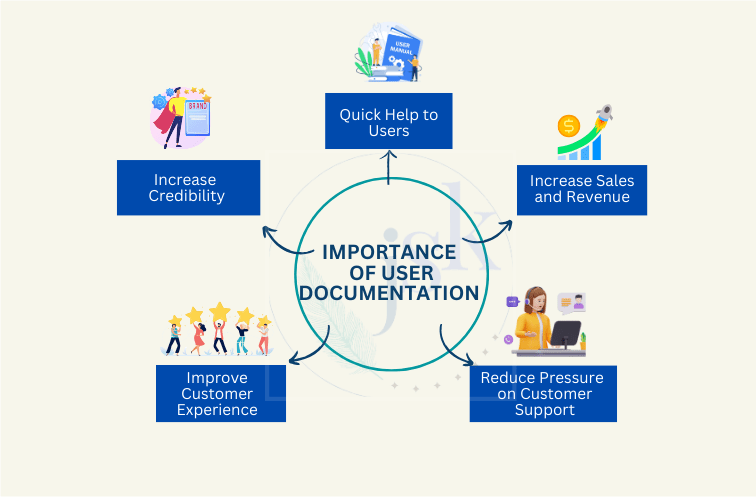
Reduces pressure on customer support
Without proper documentation, the user reaches out to customer support staff to seek a solution to his problem. Good documentation provides sufficient accessible information to the user so that the customer support team gets fewer queries.
Improves customer experience
No one likes making calls or sending emails to support staff to resolve issues. We as humans, look for self-esteem and attempt to help ourselves first. A proper documentation lets user do that and enhances user experience as he does not need to look for resources anywhere else.
Increases product’s credibility
User documentation is a tool through which user can use the product to its potential. Also, availability of well-structured and clear help manuals indicates that product team is committed to help users with every problem related to the product. It creates a professional impression on the customer’s mind and gives him confidence about the product and the business.
Increases sales and revenue
A satisfied customer can get you more sales than your best sales manager. Well, not directly but by word of mouth and future purchases. Once a business successfully builds trust in a customer’s mind through quality product and robust documentation, that trust surely converts into further sales and helps the business make more money.
How to create a user documentation?
User documentation, like the product itself, requires in-depth research and plan to successfully meet the customer’s expectations. This one-time investment and continuous management of documentation, if done with proper planning, can reap long-term results. That is why, technical writers go through the following steps to prepare a good user documentation:
- Identify the target audience
- Conduct a competitor analysis
- Create a documentation plan
- Draft the content
- Describe the processes in sequential steps
- Include practical examples wherever necessary
- Include necessary visuals to make it appealing and easy-to-understand
- Provide information on symbols, codes, and icons used in the documentation
- Test and review instructions
- Edit and send for external review
- Publish on the user’s preferred medium
Characteristics of good user documentation
A good user documentation has the following characteristics:
User-oriented
A good user documentation revolves around the users’ needs and choices. Every aspect of the documentation starting from structure and content to graphics, font, format, language and tone, all are decided as per the target audience. It enhances user experience, promotes comprehension, and enables effective problem-solving.
Accurate and complete
Different users have different background and knowledge levels. So, user documentation needs to contain complete information without any gaps or errors. Hence, it requires extensive research and validation along with references and sources. It minimizes the risk of misinformation, errors, and misunderstandings, contributing to the overall credibility of the document.
Simple language
Simple language effectively communicates ideas. The unnecessary use of technical terms, jargon or complex sentences might affect the way people understand the information.
Coherent
A documentation presenting information in a clear, consistent and easy-to-use manner ensures user understanding and avoids confusion.
Concise
Concise writing not only saves user’s reading time, but also brings clarity and usability in the documentation. It helps in easy comprehension of information and makes the content engaging by eliminating unnecessary distractions and repetitions.
Supportive visuals
Graphics, such as diagrams, screenshots, charts etc., supplement the textual information and enhances its readability and understandability. It also adds visual appeal to the document and breaks the monotony.
Easy to access
With enhancement of technology, there is a drastic increase in platforms. To increase the outreach, it has become essential to provide documentation through multiple media that are most accessible to the target user group.
Links to more resources
Documentation is a valuable resource for any product or business. And, so are the blogs, videos, website etc. For effective utilization of all resources and to provide maximum value to the user, cross-linking these assets is a must. Availability of multiple resources to guide users reflects company’s commitment to them.
Types of user documentation
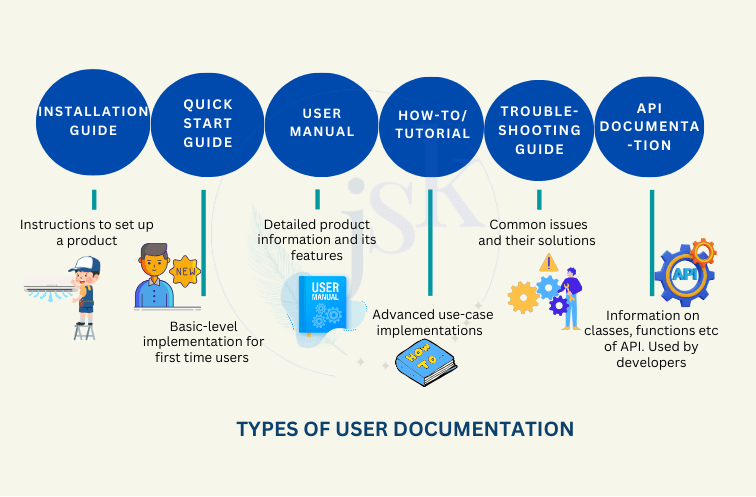
Every user is different and so are his needs. Someone wants to get started with the product and some may want to know the advanced features while other needs to resolve an issue. To cater to the varied customer requirements, documentation differs in how much and what information they deliver. Hence, there are different types of user documentation, and each one has unique characteristics.
Installation guides
Installation guides provide information about setting up a new product such as installing a new software on the system or assembling a printer. The information is organized sequentially in short steps and supported with visuals and illustrations for better understanding.
Characteristics of an installation guide:
- Target audience: Helps new user who has just purchased the product and needs to set up the product to use it for the first time.
- Information:
- Components: Describes each part of the product with its prime functionality.
- Key Features: Summarizes the features of the product.
- Prerequisites: Lists the system requirements such as disk space, processor type, and internet requirements in case of software installation.
- Installation: Provides steps for installing or setting up the product.
- Licensing: Information about licensing and detailed terms and conditions of legal agreement between user and the product owner.
- Post-installation tasks: Summarizes additional configuration tasks.
- Uninstallation: Describes steps to safely uninstall or dismantle a product.
- Other information: Covers solution to possible installation issues and other useful tips.
- Graphics: Provides images of product components and graphics to support the installation steps.
- References: Includes reference to the quick start guide, so that user knows what to refer next to use the product for the first time.
Quick start guide
The purpose of getting started guides, also known as Getting Started, is to provide basic information necessary to start using the product. They are short, typically from a few sentences to a few pages. For example, in case of a printer, a quick start guide describes the steps to take your first printout.
Characteristics of a quick start guide:
- Target audience: Provides information to new users who have set up the system, and want to get started with the product.
- Information: Describes the most basic function of the product usually by outlining in 3 to 4 broad steps.
- Graphics: Contains illustrations or screenshots to facilitate better understanding and readability.
- References: Includes mandatory references to prerequisites, installation procedure etc., just in case a user has landed to quick start guide before setting up the product. It is also a good idea to include references to key features of the product.
User manual
User manual is also known by names such as user guide, instruction manual and is also used as synonymous to technical documentation sometimes. And that is because it comprises the most elaborate description of a product and its features. User manuals provide content related to the product’s what, how, why, and when. For example, a printer manual contains information on the printer basics, control panel, use modes, features, advisories, warnings, paper handling precautions, etc.
Characteristics of a user manual are:
- Target audience: Helps users who are familiar with the product and its basic usage but want to know about a particular feature or what more can be done using the product.
- Information:
- Introductory section (title, general information, disclaimers, cautions, warnings)
- Product overview
- Scope overview
- Feature descriptions
- FAQs
- Contact details
- Glossary/index
- Graphics: Provides diagrams and images about how a certain product feature works.
- References: Includes references to installation guide and getting started section, so that a user landing to the manual directly knows where to get the kick start information from.
- Format: Usually, available through online help format. In the internet days, an online copy is not just convenient for users but also ensures easy publishing, updating, and that too at a cheaper cost.
How-to guide
How-to guides or tutorials cover add-on operations of the product. These are written assuming the target customer is well-versed about the product and its features. Continuing with printer example, documentation on how to replace cartridge is a perfect tutorial topic.
Characteristics of the how-to documentation:
- Target audience: Helps existing or old customers to achieve advanced scenarios by using the product.
- Information:
- Intends to solve a problem.
- Explains the process in steps.
- Graphics: Contains relevant images or screenshots for better comprehension.
- References: Includes references to related features.
- Format: Delivered often in the form of online help and videos to teach their customers by demonstrating the complex subjects.
Troubleshooting guide
A troubleshooting guide provides solutions to the most common errors or problems one may face while using the product. For example, while using printer, how to resolve paper-out errors or prints with streaks or blotches.
Characteristics of the troubleshooting guides:
- Target audience: Aims to help customers facing an issue while dealing with the product.
- Information:
- Covers common errors and issues.
- Tells about possible reasons behind the problem.
- Suggests solutions to fix the error.
- Provides links to online resources where related information can be accessed.
- Provides details of the support portal to cater to customers who could not resolve problems using the guide.
- References: Provides links to online resources where related information can be accessed.
- Format: Usually published online as the number of possible errors could be huge in some cases. Also, not all customers face such issues, so providing an online reference is more convenient for customers as well as businesses.
API documentation
API documentation is a part of software documentation and is generally used by developers. The term “API” stands for “Application programming interface”. It lets two software applications communicate with each other. Hence, API documentation informs how to use and integrate an API into an application. This documentation is essential for developers consuming that API.
Characteristics of the API documentation:
- Target audience: Helps developers who want to use the API for developing their own applications. CTOs also use it to make important pricing and security decisions.
- Information:
- Covers details of authentication methods, end-points, API classes, members, status codes, etc. Without this information, developers cannot consume the API effectively.
- Includes sample codes to help customers know how to use the API members.
- Graphics: Does not include images usually. However, in some cases, companies might choose to cover data flow diagrams or product architecture diagrams with the API information.
- Format: Published as online documentation.
Conclusion
In a nutshell, although different types of documentation solve specific issues of different users, there is one thing common in all. That is, documentation, whatever type it may be, empowers users to handle the product and helps businesses get satisfied customers and bigger revenues. Therefore, the importance of documentation cannot be overlooked. However, to achieve the best outcomes, documentation should be prepared with thorough planning and specialized knowledge. You and your technical writers can also achieve it with some guidance. Contact me if you are looking for a trainer or let me and my team help you create quality product documentation.
Frequently-asked questions (FAQs)
What tools and software are recommended for creating and managing various types of documentation?
For small businesses with minimal documentation needs, word processing tools such as MS Word and Google Docs might suffice in most cases. However, there are specialized tools available for more complex documentation requirements. Help Authoring Tools such as Adobe RoboHelp, MadCap Flare etc. and Content Management Systems such as WordPress are a few to name.
What are some best practices for writing user-friendly documentation?
Documentation serves the primary purpose of assisting its users. Technical writers can create user-friendly documentation by following simple but effective practices. Some key practices are:
- Understand the target audience
- Use simple and plain language
- Follow structured writing
- Provide visual content
- Use consistent formatting
How can user documentation enhance user experience?
User documentation is an infallible way of providing great user experience to the customers. It not only reduces their learning curve, but also helps in smooth onboarding process. A well-documented product saves customer’s time and effort otherwise required to solve a problem. It is the most effective resource that makes users feel comfortable with your product and its technology.


 JSK Writes
Leave a comment